> ## Documentation Index
> Fetch the complete documentation index at: https://docs.adaptyvbio.com/llms.txt
> Use this file to discover all available pages before exploring further.
# Foundry API
> Submit protein sequences for experimental characterization and retrieve results programmatically.
The Foundry API connects your computational pipeline to Adaptyv Bio's protein testing platform.
You submit sequences, the lab runs experiments, and you retrieve binding data, thermostability measurements, or expression levels via a simple webhook.
## How to Connect
You or your agent can find all information via
```
curl https://devs.adaptyvbio.com/api/v1/openapi.json
```
Every request aside from getting the `openapi.json` requires a bearer token:
```bash theme={null}
curl https://devs.adaptyvbio.com/api/v1/targets?limit=3 \
-H "Authorization: Bearer $FOUNDRY_API_TOKEN"
```
Tokens are scoped to your organization and role. See [Getting an API token](#getting-an-api-token) below for the full walkthrough, and always store your token in an environment variable rather than committing it to source control.
## Getting an API token
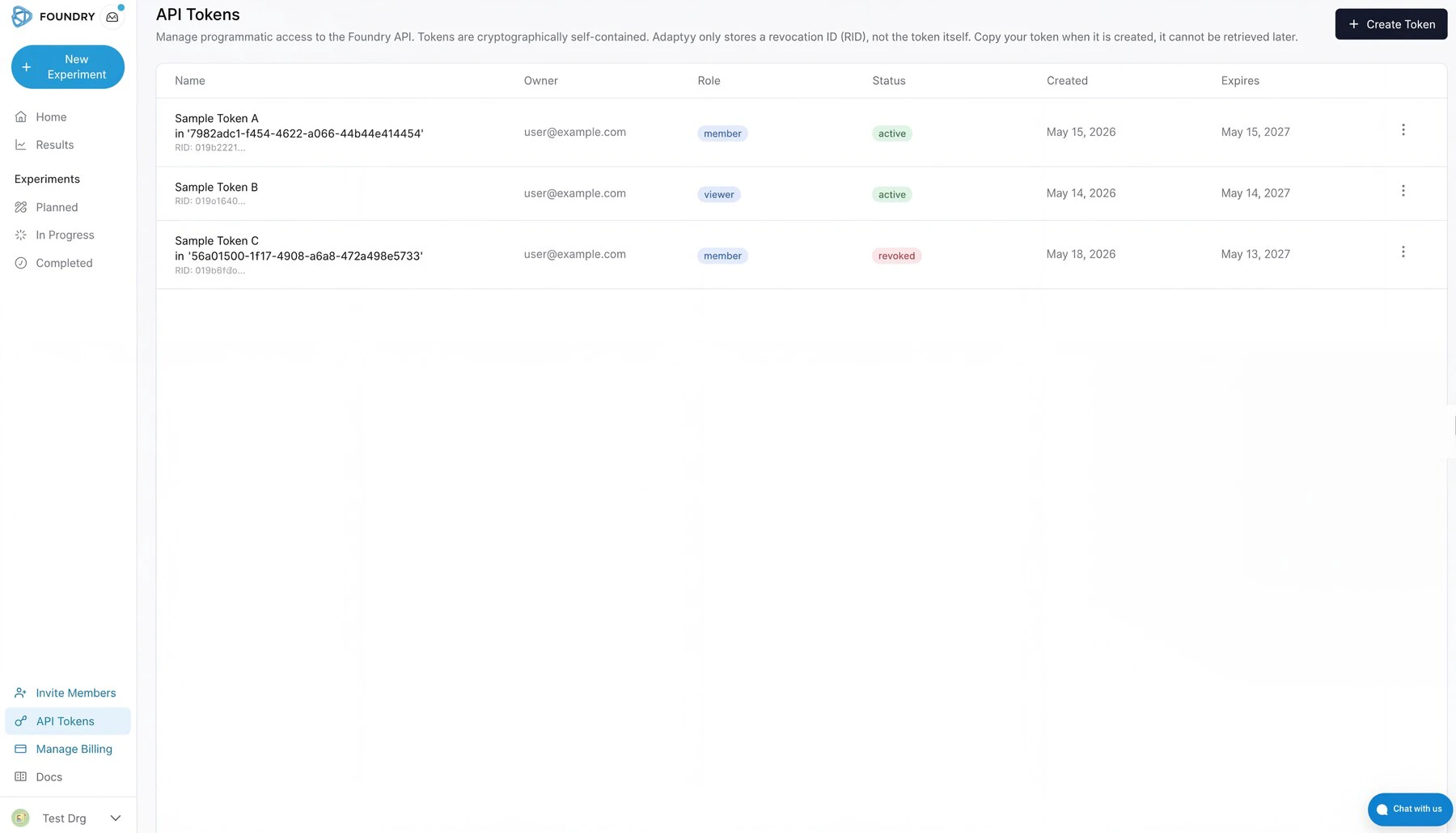
API tokens live in the [Foundry portal](https://foundry.adaptyvbio.com/) under **Organization → Settings → Tokens**. Existing tokens for your organization show their owner, role, status, creation date, and expiry. The **Create Token** button is in the top right.
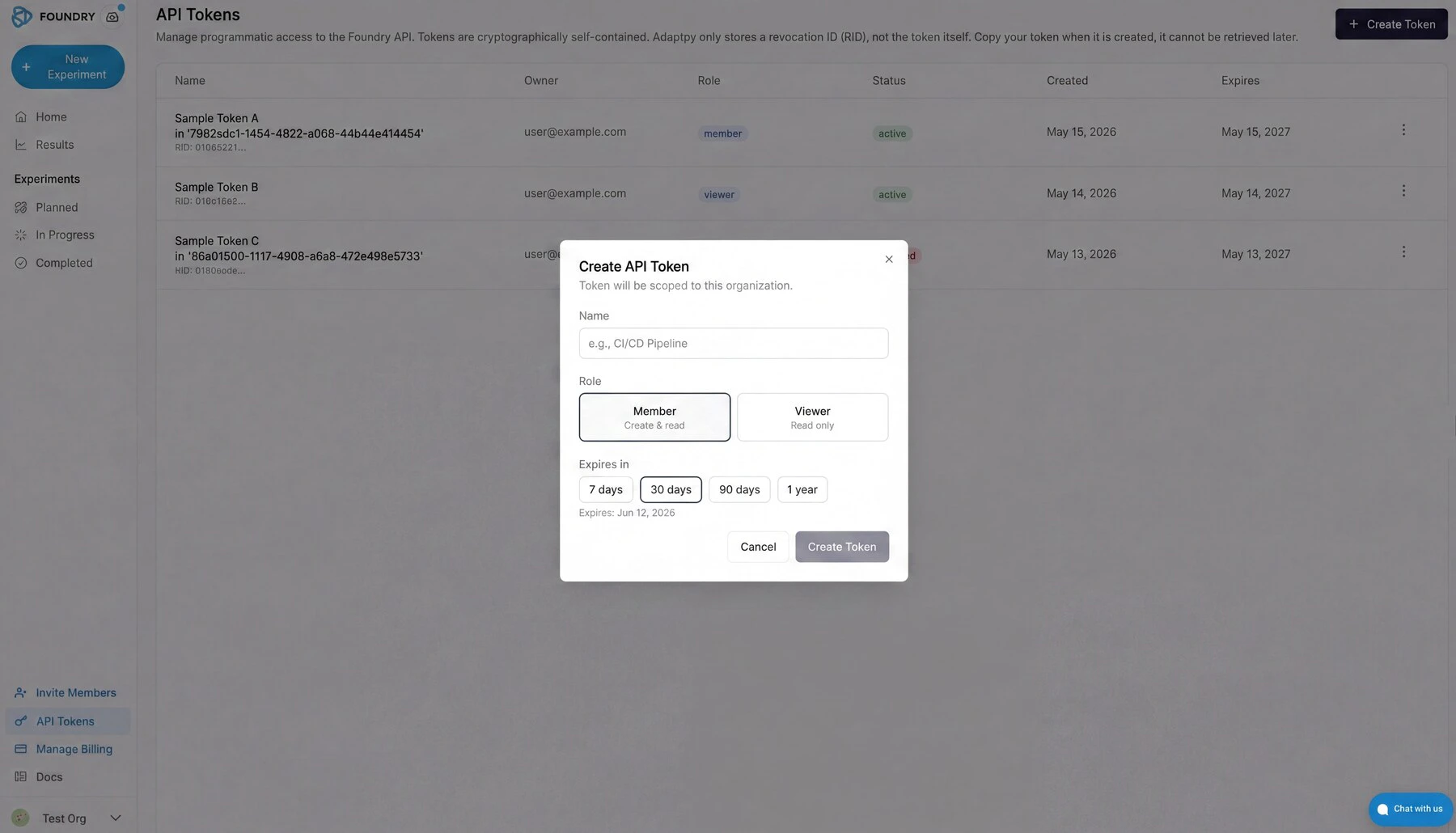
 Creating a token asks for three things: a name (for your own bookkeeping), a role, and an expiry. Pick **Member** if you need to create or modify experiments, **Viewer** for read-only access. Expiry runs from seven days to one year; pick the shortest window that still covers your use case.
 The token value is shown once, at creation time. Copy it before closing the dialog — Adaptyv only stores a revocation ID, not the token itself, and there is no way to retrieve it later. Revoking a token from the same page invalidates it immediately for both REST API and MCP use.
## What the API covers
The API exposes five resource groups. Together, they support the full experiment lifecycle: browse targets, submit sequences, track progress, and collect results.
**Targets:** Browse [our catalog](https://targets.adaptyvbio.com/) of available target antigens programmatically.
You can filter by name, vendor, or self-service availability. Targets for which we have a calibrated self-service price allow instant cost estimates and automated checkout.
**Experiments:** Create experiments by specifying a target and one or more protein sequences. Five experiment types are available:
| Type | What it measures | Requires target |
| ----------------- | --------------------------------------------------------- | --------------- |
| `screening` | Binding yes/no against a target antigen (BLI or SPR) | Yes |
| `affinity` | Binding kinetics: K\_D, k\_on, k\_off (BLI or SPR) | Yes |
| `thermostability` | Melting temperature via differential scanning fluorimetry | No |
| `fluorescence` | Fluorescence intensity of protein variants | No |
| `expression` | Expression yield of protein constructs | No |
For more information about each see [the experiment types documentation](https://docs.adaptyvbio.com/docs/experiment-types/).
**Sequences:** List, inspect, and add sequences to draft experiments. Each sequence is a single amino acid string; multi-chain formats (Fab heavy:light) use a colon separator.
**Results:** Retrieve experimental data once the lab completes your run. Results include binding classifications, kinetic constants, melting temperatures, or expression levels, depending on experiment type.
**Quotes and invoices:** Review pricing, confirm quotes, and access invoices for your experiments.
## Experiment lifecycle
The diagram below shows how an experiment moves from draft to delivered results. You control the transitions on the left (create, submit, confirm); everything on the right happens in the lab.
```mermaid theme={null}
sequenceDiagram
participant You as You (API caller)
participant API as Foundry API
participant Lab as Adaptyv Lab
Note over You,Lab: 1. Design & draft
You->>API: POST /experiments
API-->>You: experiment_id, status: Draft
Note over You: Edit freely — add sequences,
The token value is shown once, at creation time. Copy it before closing the dialog — Adaptyv only stores a revocation ID, not the token itself, and there is no way to retrieve it later. Revoking a token from the same page invalidates it immediately for both REST API and MCP use.
## What the API covers
The API exposes five resource groups. Together, they support the full experiment lifecycle: browse targets, submit sequences, track progress, and collect results.
**Targets:** Browse [our catalog](https://targets.adaptyvbio.com/) of available target antigens programmatically.
You can filter by name, vendor, or self-service availability. Targets for which we have a calibrated self-service price allow instant cost estimates and automated checkout.
**Experiments:** Create experiments by specifying a target and one or more protein sequences. Five experiment types are available:
| Type | What it measures | Requires target |
| ----------------- | --------------------------------------------------------- | --------------- |
| `screening` | Binding yes/no against a target antigen (BLI or SPR) | Yes |
| `affinity` | Binding kinetics: K\_D, k\_on, k\_off (BLI or SPR) | Yes |
| `thermostability` | Melting temperature via differential scanning fluorimetry | No |
| `fluorescence` | Fluorescence intensity of protein variants | No |
| `expression` | Expression yield of protein constructs | No |
For more information about each see [the experiment types documentation](https://docs.adaptyvbio.com/docs/experiment-types/).
**Sequences:** List, inspect, and add sequences to draft experiments. Each sequence is a single amino acid string; multi-chain formats (Fab heavy:light) use a colon separator.
**Results:** Retrieve experimental data once the lab completes your run. Results include binding classifications, kinetic constants, melting temperatures, or expression levels, depending on experiment type.
**Quotes and invoices:** Review pricing, confirm quotes, and access invoices for your experiments.
## Experiment lifecycle
The diagram below shows how an experiment moves from draft to delivered results. You control the transitions on the left (create, submit, confirm); everything on the right happens in the lab.
```mermaid theme={null}
sequenceDiagram
participant You as You (API caller)
participant API as Foundry API
participant Lab as Adaptyv Lab
Note over You,Lab: 1. Design & draft
You->>API: POST /experiments
API-->>You: experiment_id, status: Draft
Note over You: Edit freely — add sequences,
change target, adjust parameters
You->>API: PATCH /experiments/{id}
API-->>You: updated
Note over You,Lab: 2. Submit for review
You->>API: POST /experiments/{id}/submit
API-->>You: status: WaitingForConfirmation
Lab->>API: Review experiment, prepare quote
API-->>You: status: QuoteSent
Note over You,Lab: 3. Quote & confirm
You->>API: GET /experiments/{id}/quote
API-->>You: line items, total, PDF link
You->>API: POST /quotes/{id}/confirm
API-->>You: status: WaitingForMaterials
Note over You,Lab: 4. Lab processing (5–15 days)
Lab->>API: Order gene fragments & target
API-->>You: status: WaitingForMaterials
Lab->>API: Materials arrive, begin assay
API-->>You: status: InProduction
Lab->>API: Raw data collected
API-->>You: status: DataAnalysis
Lab->>API: QC complete
API-->>You: status: InReview
Note over You,Lab: 5. Results
Lab->>API: Results released
API-->>You: status: Done
You->>API: GET /experiments/{id}/results
API-->>You: binding data, kinetics, Tm, …
```
**API status values** and what they mean:
| Status | Who acts | What is happening |
| ------------------------ | -------- | -------------------------------------------------------------------- |
| `Draft` | You | Experiment is editable. No cost commitment. |
| `WaitingForConfirmation` | Adaptyv | Under review; quote is being prepared. |
| `QuoteSent` | You | Quote ready — review and confirm to proceed. |
| `WaitingForMaterials` | Adaptyv | Gene fragments and target antigen ordered. |
| `InQueue` | Adaptyv | Materials arrived; queued for the lab. |
| `InProduction` | Adaptyv | Assay running. |
| `DataAnalysis` | Adaptyv | Raw data processing and QC. |
| `InReview` | Adaptyv | Final validation before release. |
| `Done` | You | Results available via the API. |
| `Canceled` | Either | Experiment canceled (possible from Draft or WaitingForConfirmation). |
You can poll status at any time with `GET /experiments/{id}`. The `results_status` field tells you whether results are `none`, `partial`, or `all` without fetching the full dataset. To receive push notifications instead of polling, pass a `webhook_url` when creating the experiment.
## Quick example
This snippet creates a binding screen against a target from the catalog:
```bash theme={null}
export FOUNDRY_API_URL="https://devs.adaptyvbio.com/api/v1/openapi.json"
# 1. Find a target
curl "$FOUNDRY_API_URL/targets?search=EGFR&selfservice_only=true&limit=1" \
-H "Authorization: Bearer $FOUNDRY_API_TOKEN"
# Response includes target_id, pricing, and catalog details
```
```bash theme={null}
# 2. Create the experiment
curl -X POST "$FOUNDRY_API_URL/experiments" \
-H "Authorization: Bearer $FOUNDRY_API_TOKEN" \
-H "Content-Type: application/json" \
-d '{
"name": "EGFR Binding Screen — Round 3",
"experiment_spec": {
"experiment_type": "screening",
"method": "bli",
"target_id": "019a03da-b87f-7902-81d5-24da9754bdde",
"sequences": {
"candidate_1": "EVQLVESGGGLVQPGGSLRLSCAASGFNIKDTYIHWVRQAPGKGLEWVARIYPTNGYTRYADSVKGRFTISADTSKNTAYLQMNSLRAEDTAVYYCSRWGGDGFYAMDYWGQGTLVTVSS",
"candidate_2": "QVQLVQSGAEVKKPGASVKVSCKASGYTFTNYGISWVRQAPGQGLEWMGWISAYNGNTNYAQKLQGRVTMTTDTSTSTAYMELRSLRSDDTAVYYCARGGYSSSWYFDYWGQGTLVTVSS"
}
}
}'
# Response:
# {
# "experiment_id": "019d4a2b-...",
# "experiment_code": "ORG-001-123",
# "status": "draft",
# "costs": { ... }
# }
```
```bash theme={null}
# 3. Submit for processing
curl -X POST "$FOUNDRY_API_URL/experiments/019d4a2b-.../submit" \
-H "Authorization: Bearer $FOUNDRY_API_TOKEN"
```
```bash theme={null}
# 4. Check results (once the experiment reaches "done")
curl "$FOUNDRY_API_URL/experiments/019d4a2b-.../results" \
-H "Authorization: Bearer $FOUNDRY_API_TOKEN"
```
## Filtering and sorting
List endpoints accept `filter`, `sort`, and `search` query parameters.
**Filtering** uses an s-expression syntax, in order to make it easier for you (and your agents) to compose complex filter conditions.
Wrap the expression in the `filter` parameter:
```
GET /experiments?filter=eq(status,"draft")
GET /experiments?filter=and(eq(status,"done"),gte(created_at,"2026-01-01"))
```
Available operators: `eq`, `neq`, `gt`, `gte`, `lt`, `lte`, `contains`, `between`, `in`, `is_null`, `is_not_null`. Combine with `and`, `or`, `not`.
**Sorting** uses `asc(field)` or `desc(field)`:
```
GET /experiments?sort=desc(created_at)
GET /results?sort=asc(created_at),desc(binding_score)
```
**Search** is a free-text substring match on name fields:
```
GET /targets?search=HER2
```
**Pagination** uses `limit` (1--100, default 50) and `offset` as usual:
```
GET /experiments?limit=10&offset=20
```
## Webhooks
Register a `webhook_url` when you create an experiment to receive push notifications instead of polling:
```json theme={null}
{
"name": "Screen with webhook",
"webhook_url": "https://your-server.com/foundry-hook",
"experiment_spec": { ... }
}
```
When you set a `webhook_url` on an experiment, you receive an `experiment_update` POST for every customer-facing update we post to that experiment — the same updates that trigger an email notification.
Each delivery is an HTTP `POST` with this body:
```json theme={null}
{
"delivery_id": "019b8da3-4a91-16c6-fa94-619212bee6a6",
"event": "experiment_update",
"timestamp": "2026-07-01T14:30:00Z",
"api_version": "2026-02",
"data": {
"type": "experiment.update",
"experiment_id": "019d4a2b-2b7e-7c3a-9f1e-2a4b6c8d0e1f",
"experiment_code": "ORG-001-123",
"organization_id": "11111111-1111-1111-1111-111111111111",
"update_id": "019d4a2c-3c8f-7d4b-a02f-3b5c7d9e1f20",
"name": "Materials received",
"description": "Your target protein arrived and QC passed.",
"update_type": "progress",
"eta": "2026-07-15T00:00:00Z",
"created_at": "2026-07-01T14:30:00Z"
}
}
```
### Verifying deliveries
Every request carries these headers:
| Header | Meaning |
| ----------------------- | -------------------------------------------------- |
| `X-Adaptyv-Event` | Event slug (e.g. `experiment_update`) |
| `X-Adaptyv-Delivery-Id` | Unique id for this delivery attempt |
| `X-Adaptyv-Signature` | `sha256=` HMAC-SHA256 of the raw request body |
Verify the signature over the raw body with your webhook secret before trusting a payload:
```python theme={null}
import hashlib, hmac
def is_valid(raw_body: bytes, secret: str, header: str) -> bool:
expected = "sha256=" + hmac.new(secret.encode(), raw_body, hashlib.sha256).hexdigest()
return hmac.compare_digest(expected, header)
```
Respond with a `2xx` to acknowledge. Deliveries are retried up to 3 times with exponential backoff on network errors and `5xx` responses; a `4xx` is treated as permanent and not retried.
## Cost estimates
Before committing to an experiment, you can get a cost estimate:
```bash theme={null}
curl -X POST "$FOUNDRY_API_URL/experiments/cost-estimate" \
-H "Authorization: Bearer $FOUNDRY_API_TOKEN" \
-H "Content-Type: application/json" \
-d '{
"experiment_spec": {
"experiment_type": "screening",
"method": "bli",
"target_id": "019a03da-b87f-7902-81d5-24da9754bdde",
"sequences": {
"s1": "EVQLVESGGGLVQPGG..."
}
}
}'
```
The response breaks down assay costs and material costs separately, in USD cents.
## SDKs
Official Python SDK: [`adaptyv-sdk`](https://github.com/adaptyvbio/adaptyv-sdk).
```python theme={null}
from adaptyv_sdk import AdaptyvClient
import os
client = AdaptyvClient(api_key=os.environ["ADAPTYVBIO_API_TOKEN"])
experiments = client.experiments.list(limit=5)
```
## Using the API from Claude and other AI assistants
The same endpoints are exposed as MCP tools at `https://mcp.adaptyvbio.com/mcp/`. Point Claude Code, Claude Desktop, Cursor, or your own MCP-aware client at that URL with your Foundry token in the `Authorization` header, and the agent calls the API for you in plain English. See [MCP Server](/api-reference/mcp-server) for the connection details and a walkthrough of what it enables.